
In this article
- Before day 1: what to prepare
- How to launch an OTT app: the 7-day plan
- Day 1: Brand your app
- Days 2 and 3: Upload your content
- Day 4: Set monetization
- Days 5 and 6: Test everything
- Day 7: Launch
- Build in-house vs launch on a platform
- Which devices should you launch on?
- OTT app launch checklist
- Common causes of launch delays
- After launch: the first 30 days
- Key takeaways
- Frequently asked questions
- Can I really launch an OTT app in 7 days?
- Do I need developers to create an OTT app?
- What do I need before I start a streaming service?
- Should I launch on mobile or TV first?
If you are researching how to launch an OTT app, you have probably heard that it takes a year and a team of engineers. That used to be true. With a white-label platform, a content owner can go from sign-up to App Store and Google Play submission in seven days.
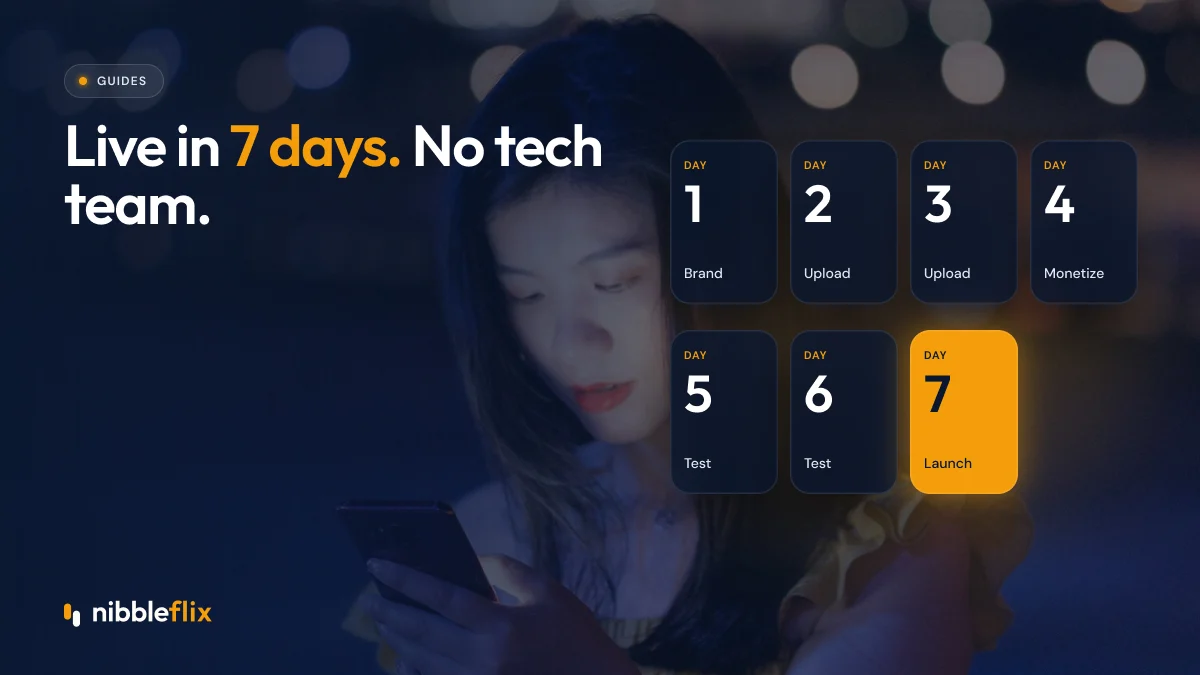
Short answer: to launch an OTT app in 7 days, use a no-code white-label platform: brand your app on day 1, upload content on days 2 and 3, set monetization on day 4, test on days 5 and 6, and submit to the app stores on day 7.
This guide walks through each day, the preparation you need beforehand, and a checklist you can use to start a streaming service without a tech team.
Before day 1: what to prepare
The seven days go smoothly when the business decisions are made first. Gather these before you sign up:
- Content and rights: video files, plus confirmation you can stream them in your target countries.
- Artwork: posters, thumbnails and banners for each title.
- Brand assets: logo, app icon, colors and fonts.
- Developer accounts: your own Apple Developer and Google Play Console accounts, so the apps are listed under your name.
- Monetization plan: subscription, ads, rentals, pay-per-episode or a hybrid.
- Legal pages: terms of use and a privacy policy, including GDPR if you serve viewers in the EU.
Store review rules require these details, so having them ready avoids delays on day 7.
How to launch an OTT app: the 7-day plan
Day 1: Brand your app
Add your logo, icon, colors and app name. Choose your home screen layout and rows, such as featured, new releases, genres and continue watching. Write your store listing description and prepare screenshots.
Days 2 and 3: Upload your content
Upload videos through the CMS, add titles, descriptions, cast and genres, and organize them into collections. AI metadata generation can draft descriptions and tags, AI subtitles cover 12 languages, and AI trailer generation creates a promo in about two minutes.
Day 4: Set monetization
Choose how you earn. Options on NibbleFlix include subscriptions (SVOD), advertising (AVOD), rentals (TVOD), pay-per-episode, coins, in-app purchases and promotional offers, alone or combined in a hybrid model. Set prices per region and decide what is free.
Days 5 and 6: Test everything
Install test builds on real phones, tablets and TVs. Sign up as a new viewer, play titles on different networks, buy a subscription, cancel it, and check that ads and subtitles behave as expected. Fix artwork or metadata issues as you find them.
Day 7: Launch
Submit to the App Store and Google Play under your developer accounts, and publish your web app. Store review times vary, so plan your marketing launch for a few days after submission.
Build in-house vs launch on a platform
| Step | Build in-house | NibbleFlix white-label |
|---|---|---|
| App development | Separate projects for each device | Apps ready to brand |
| Video pipeline | Encoding and delivery to set up | Included |
| Payments and ads | Integrations to build | Configured in a dashboard |
| Content management | Custom admin tools | No-code CMS |
| Time to store submission | Many months | 7 days |
| Team needed | Engineers, QA, DevOps | No in-house tech team |
Not sure what a white-label provider includes? Read what a white-label OTT platform is.
Which devices should you launch on?
Start where your viewers are. For mobile-first audiences in Southeast Asia, Latin America and MENA, iOS and Android come first. For long-form films and series in Europe, smart TV apps matter just as much.
NibbleFlix covers iOS, Android, responsive web and PWA, plus smart TV apps for Apple TV, Android TV, Amazon Fire TV, Roku, Samsung and LG. See the full device list. Each TV store has its own review process, so you can roll out TV apps in stages after your mobile launch.
OTT app launch checklist
- Content rights confirmed for each territory.
- Apple and Google developer accounts in your company name.
- Logo, icon, colors and store screenshots ready.
- All titles uploaded with artwork, descriptions and subtitles.
- Pricing set per region, with free content defined.
- Terms of use and privacy policy published.
- Test purchases, cancellations and playback completed on real devices.
- Marketing plan ready for the week after store approval.
Common causes of launch delays
Most delays come from outside the platform. Developer account verification can take time, so open your Apple and Google accounts early. Missing rights for one territory can force you to restrict a title. Low-quality artwork or vague store descriptions can trigger review questions. And apps that sell digital content must follow each store’s in-app purchase rules, so confirm your pricing setup before submission.
After launch: the first 30 days
Launching is the start. In the first month, watch sign-ups, trial conversions, churn and the titles people actually finish. Add new content on a regular schedule, send push alerts for new releases, and adjust pricing based on what you learn. With one dashboard for every app, you can see earnings and make changes without code.
If you join the NibbleFlix founding partner program, launch pricing is locked for the first year, you get a dedicated launch manager, and your feature requests are prioritized on the roadmap. Details are on our pricing page.
Key takeaways
- Learning how to launch an OTT app today is mainly about preparation, not programming.
- Prepare content rights, brand assets and developer accounts before day 1.
- A no-code platform can take you from sign-up to store submission in seven days.
- Test on real devices and networks before you submit.
- Plan marketing for after store approval, then keep releasing content.
Ready to launch your own branded streaming service? Book a demo and we will map out your seven days.
Frequently asked questions
Can I really launch an OTT app in 7 days?
Yes, if your content, rights and brand assets are ready. On NibbleFlix, the seven days run from sign-up to App Store and Google Play submission: brand on day 1, upload on days 2 and 3, monetization on day 4, testing on days 5 and 6, and submission on day 7. Store review time comes after that.
Do I need developers to create an OTT app?
Not with a white-label platform. NibbleFlix requires no code and no in-house tech team, and launch support is included. You manage branding, content, pricing and releases from a dashboard, while the platform provides the iOS, Android, web and smart TV apps and keeps them up to date.
What do I need before I start a streaming service?
You need content with streaming rights for your target countries, artwork, a logo and app icon, your own Apple and Google developer accounts, a monetization plan, and legal pages such as terms of use and a privacy policy. Preparing these first keeps the seven-day launch on track.
Should I launch on mobile or TV first?
Start where your audience watches. Mobile-first markets such as Southeast Asia, Latin America and MENA usually begin with iOS and Android. Services built around films and long series often need smart TV apps early. Many operators launch mobile and web first, then add TV platforms in stages.