
In this article
- Why promo volume matters for streaming apps
- How an AI trailer generator works
- AI video promo vs manual editing
- What makes a good streaming trailer
- Promo clips for social and beyond
- Social media
- App store pages
- Inside your app
- Email and push
- AI highlights for regional audiences
- Using the AI trailer generator in NibbleFlix
- Key takeaways
- Frequently asked questions
- What is an AI trailer generator?
- Are AI-generated trailers good enough to publish?
- Can AI trailers be made in vertical format?
- How long should a streaming promo be?
Every new series, season and episode needs promotion, and promotion needs video. For a small streaming team, cutting trailers by hand quickly becomes a bottleneck. An AI trailer generator removes most of that work by scanning your episodes and assembling a short promo from the strongest moments.
The short answer: an AI trailer generator analyzes a full episode or film, picks key scenes based on dialogue, action and emotion, and cuts them into a short promo you can review, adjust and publish, often in a few minutes instead of a few days.
This guide covers how these tools work, what makes a trailer effective, and how to fit AI promos into your marketing.
Why promo volume matters for streaming apps
Viewers decide fast. A home screen tile, an app store preview or a social clip has a few seconds to earn a tap. The services that grow tend to have a steady stream of fresh promos across every channel, not one polished trailer per season.
Competition for attention is intense, especially in short-form drama. Apptopia reports that the top seven US microdrama apps passed 11 million monthly downloads, and major platforms including Disney+, Netflix and Prime Video launched short vertical video features in 2026. Standing out takes a lot of creative, produced quickly.
How an AI trailer generator works
Most tools follow a similar process:
- Analyze the video. The AI reads the transcript, detects faces, scene changes, music and motion, and scores moments for intensity.
- Find the story beats. It looks for the setup, the conflict and the hook, such as a reveal, a confrontation or a cliffhanger.
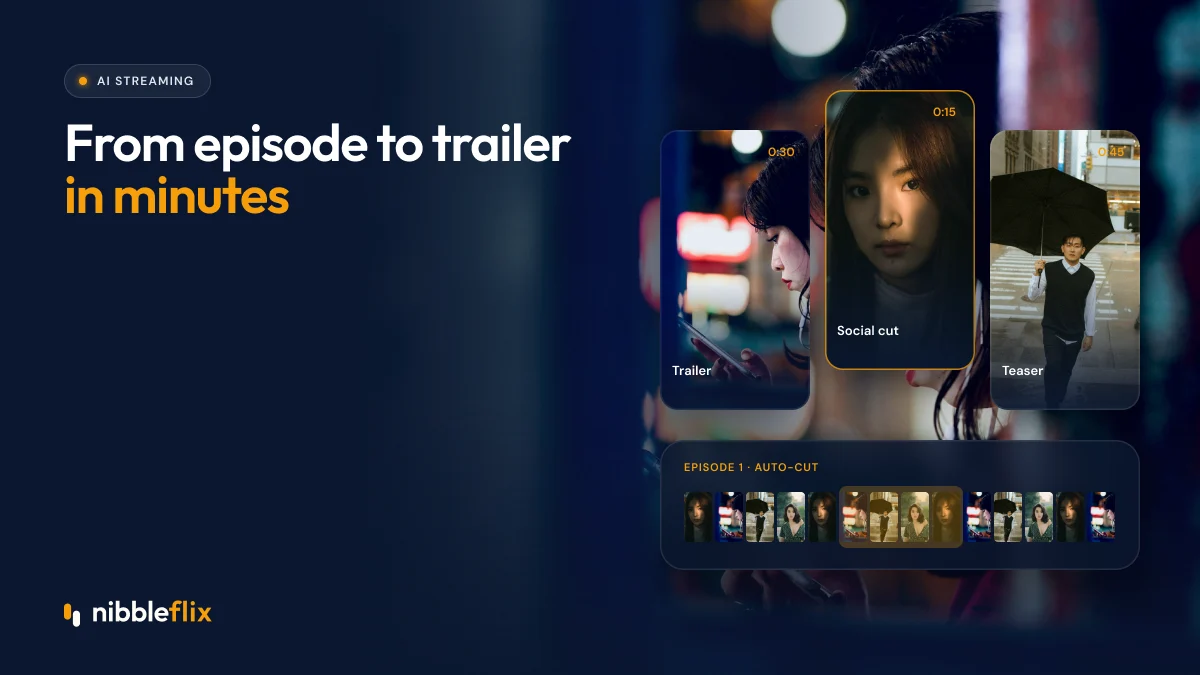
- Assemble a cut. Selected clips are trimmed and ordered into a short sequence with pacing that builds.
- Format for each placement. The same cut can be exported in 16:9 for TV and web or 9:16 for phones and social.
- Hand off for review. You preview, swap clips, trim and approve before publishing.
AI video promo vs manual editing
| Factor | AI-generated trailer | Manually edited trailer |
|---|---|---|
| Turnaround | Minutes | Hours to days |
| Cost per promo | Low, scales with volume | Editor time for every cut |
| Volume | A promo for every episode | Usually only hero titles |
| Creative control | Good, with review and edits | Full control |
| Best for | Episode promos, social clips, tests | Flagship launches and brand campaigns |
Most teams use both. AI handles the everyday volume, and human editors focus on the few launches that deserve a crafted campaign.
Volume also changes how you learn. When each promo costs little, you can run three versions of the same episode with different openings and keep the one that earns the most taps. Over a few weeks, those tests show which hooks, characters and moods your audience responds to.
What makes a good streaming trailer
AI speeds up the cut, but the principles of a good promo still apply. When reviewing an AI draft, check for these:
- A hook in the first three seconds. Open on a striking line, a face in close-up or a moment of tension.
- A clear premise. Viewers should understand who the story is about and what is at stake.
- No major spoilers. Tease the twist, do not show it.
- An open ending. End on a question or cliffhanger that makes people want episode one.
- Readable on mute. Many people watch social video without sound, so subtitles help.
- The right length. Short cuts for social feeds, longer cuts for app pages and websites.
Promo clips for social and beyond
Once you can produce promos quickly, you can use them everywhere:
Social media
Vertical clips for TikTok, Instagram Reels and YouTube Shorts are the main discovery channel for many micro-drama and entertainment apps. Test several hooks per episode and keep the winners running.
App store pages
Preview videos on the App Store and Google Play can lift conversion from page view to install. Refresh them when you launch a major new series.
Inside your app
Autoplay previews on the home screen and series pages help viewers choose. For micro-drama apps with a vertical 9:16 player, short teasers between episodes keep the binge going.
Email and push
Pair a new-episode push alert or email with a short clip or animated thumbnail to drive return visits.
For a full plan, see our 90-day launch plan for marketing a streaming app.
AI highlights for regional audiences
Different markets respond to different hooks. A romance promo for Southeast Asia may lead with emotion, while an action promo for Latin America may lead with a stunt. Because AI trailers are cheap to produce, you can cut separate versions for each region and add AI subtitles in local languages. Pair them with strong titles and descriptions, as covered in our guide to AI video metadata.
Using the AI trailer generator in NibbleFlix
NibbleFlix includes AI trailer generation as part of its AI streaming tools, creating a trailer in about two minutes from an uploaded episode. You can review it, then use it in your branded apps and marketing. The same toolset includes AI subtitles in 12 languages, AI dubbing and AI metadata generation, all from one dashboard with no code. Read more in five AI tools every streaming service should use.
Key takeaways
- AI trailer generators turn full episodes into promos in minutes.
- They make it realistic to have a promo for every episode, not just hero titles.
- Always review for hook, clarity, spoilers and ending before publishing.
- Use the same clips across social, app stores, in-app previews and push campaigns.
Want to see an AI trailer cut from your own content? Book a demo and we will generate one with you.
Frequently asked questions
What is an AI trailer generator?
An AI trailer generator is a tool that analyzes a full episode or film and automatically cuts a short promo from its strongest moments. It looks at dialogue, faces, motion and music to find hooks and story beats, then assembles them into a trailer you can review, edit and publish for marketing.
Are AI-generated trailers good enough to publish?
Often yes, after a quick review. AI drafts are usually solid for episode promos and social clips. A person should still check the opening hook, remove spoilers, confirm the clip makes sense and make sure the ending creates curiosity. For flagship launches, many teams still have an editor polish the final cut.
Can AI trailers be made in vertical format?
Yes. Many tools can export both horizontal 16:9 cuts for TV and web and vertical 9:16 cuts for phones and social feeds. Vertical promos are especially useful for micro-drama apps and for TikTok, Instagram Reels and YouTube Shorts, where most discovery for short-form content now happens.
How long should a streaming promo be?
It depends on where it runs. Social clips usually work best when short, often under 30 seconds, with a hook in the first three seconds. App store previews and website trailers can run longer. Producing several lengths from one episode lets you match each placement without extra editing work.