
In this article
- What is an OTT content management system?
- Core jobs of a video CMS for OTT
- 1. Upload and processing
- 2. Video library management
- 3. Metadata and artwork
- 4. Monetization rules
- 5. Release scheduling
- 6. Reporting
- Streaming CMS feature checklist
- Good CMS vs frustrating CMS
- CMS needs by streaming model
- Micro-drama
- Entertainment OTT
- FAST channels
- How to evaluate a video CMS
- The NibbleFlix CMS
- Key takeaways
- Frequently asked questions
- What does a video CMS for OTT do?
- Is a streaming CMS different from a website CMS?
- Can I manage several streaming apps from one CMS?
- Why does release scheduling matter for streaming services?
Behind every streaming app is a back office where content gets uploaded, described, priced and scheduled. A video CMS for OTT is that back office, and its quality decides how fast your team can work once the app is live.
The direct answer: a good video CMS for OTT lets non-technical staff upload and organize content, manage metadata and artwork, set prices and access rules, schedule releases across every app, and see performance and earnings, all without code.
This guide explains what an OTT content management system should do, the features that separate good from frustrating, and how to evaluate one.
What is an OTT content management system?
An OTT content management system is the admin tool that controls what viewers see in your apps. It is different from a website CMS. Instead of pages and blog posts, it manages videos, series, seasons, episodes, channels, prices and release dates across mobile, web and TV apps.
A streaming CMS usually connects to several other systems: video processing, the player, payments, ad servers and analytics. The best ones hide that complexity, so your editors only see a clear dashboard.
Core jobs of a video CMS for OTT
1. Upload and processing
Editors should be able to drag in a video file and let the platform handle transcoding, adaptive bitrate packaging and thumbnails. Bulk upload matters for large catalogs and for micro-drama series with dozens of short episodes.
2. Video library management
Video library management covers organizing titles into series, seasons, collections and categories, plus tagging by genre, language and rights. Good search and filters save hours every week once your library grows.
3. Metadata and artwork
Titles, descriptions, cast, tags and artwork drive discovery in your app and in app store search. AI metadata generation can draft descriptions and tags in several languages, which your team then reviews.
4. Monetization rules
The CMS should let you decide per title or per episode whether content is free, part of a subscription, ad-supported, rentable, or unlocked by coins. Changing a price should take seconds, not a developer ticket.
5. Release scheduling
Release scheduling lets you plan drops in advance and have them go live automatically, including new-episode push alerts. This is essential for micro-drama services that publish daily and for OTT services building weekly habits.
6. Reporting
Editors and finance teams need to see what is watched, what converts and what earns, directly in the same dashboard.
Streaming CMS feature checklist
- Bulk upload with automatic transcoding
- Series, season and episode structure
- Multi-language metadata and subtitles
- AI subtitles, AI metadata and AI trailer generation
- Per-title pricing and access rules
- Release scheduling with push notifications
- Geo-restrictions and licence windows
- Home screen and rail curation
- Earnings and viewing reports
- Multiple apps managed from one dashboard
- User roles and permissions
For the wider platform view, see our OTT platform features checklist.
Good CMS vs frustrating CMS
| Task | Good video CMS | Frustrating video CMS |
|---|---|---|
| Upload 50 episodes | Bulk upload, auto-processing | One file at a time, manual encoding |
| Change a price | Edit in dashboard, live instantly | Developer ticket and app update |
| Schedule a release | Pick date and time, auto-publish | Someone must publish manually |
| Add a new language | AI subtitles, review and publish | External vendor, weeks of waiting |
| Check earnings | Built-in reports | Export data to spreadsheets |
CMS needs by streaming model
Micro-drama
Micro-drama apps handle many short episodes, so bulk upload, per-episode pricing, coin unlock rules and daily release scheduling matter most. Settings such as how many episodes are free must be easy to test and change. See the micro-drama solution.
Entertainment OTT
Long-form services need strong catalog organization, licence windows by territory, curated home screens and subscription tier management.
FAST channels
Linear channels need EPG scheduling and ad break markers for server-side ad insertion. The CMS should show the schedule as a timeline that editors can adjust.
How to evaluate a video CMS
Do not judge a CMS from screenshots. Ask for a trial account and run a real workflow:
- Upload a short series with subtitles and artwork.
- Set the first episodes free and lock the rest behind a price.
- Schedule the next episode for tomorrow with a push alert.
- Translate the metadata into a second language.
- Check where viewing and revenue reports appear.
If a non-technical team member can do all five without help, the CMS will support your growth. If not, every task will become a bottleneck after launch.
The NibbleFlix CMS
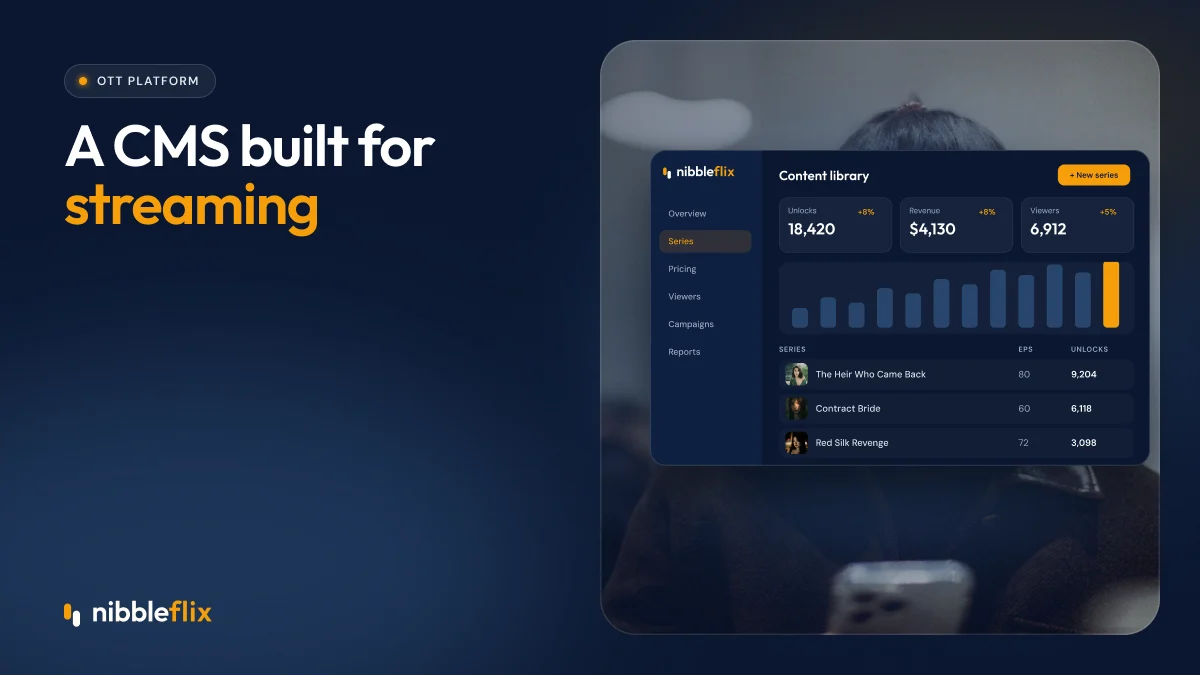
The NibbleFlix admin dashboard and CMS lets you upload episodes, set prices, schedule releases and see earnings without code. One dashboard runs every app you launch, whether micro-drama, entertainment OTT or FAST channels.
Built-in AI tools add subtitles in 12 languages, dubbing, metadata generation and trailers of about two minutes, covered in five AI tools every streaming service should use. Pricing rules connect directly to all monetization models, including subscriptions, ads, rentals, coins and hybrid setups.
Key takeaways
- A video CMS for OTT controls content, metadata, pricing, scheduling and reporting across every app.
- No-code control over prices and releases keeps your team fast.
- AI tools for subtitles and metadata cut localization time.
- Each streaming model has different CMS priorities.
- Test a CMS with a real workflow before you choose.
Want to see the dashboard in action? Book a demo and run a release from upload to publish.
Frequently asked questions
What does a video CMS for OTT do?
It manages everything viewers see in your streaming apps: video uploads, series structure, metadata, artwork, prices, access rules and release dates. A good one also shows viewing and earnings reports. It lets non-technical staff run the service day to day without developers or app updates for every change.
Is a streaming CMS different from a website CMS?
Yes. A website CMS manages pages and articles, while a streaming CMS manages video assets, episodes, monetization rules, licence windows and release schedules across mobile, web and TV apps. It also connects to video processing, payments and analytics, which website tools are not designed to handle.
Can I manage several streaming apps from one CMS?
On NibbleFlix, yes. One dashboard manages every app you launch, so you can run a micro-drama app and a long-form OTT app side by side. Each app keeps its own branding, catalog and pricing, while your team works from a single login and set of reports.
Why does release scheduling matter for streaming services?
Regular releases build viewing habits and reduce churn. Scheduling lets you plan drops in advance and publish automatically with new-episode alerts, even outside office hours. This is especially important for micro-drama apps with daily episodes and for services serving viewers across several time zones.